 Paperwell
The PDF editor that respects your files.
Edit text, sign contracts, fill forms, and convert to Word. All of it happens on your device, so your documents stay yours.
Free to download. Pro starts at $3.99 a month.
Every PDF job, handled. Without the subscription shock.
Paperwell covers the daily PDF jobs, from a quick signature to a full redaction pass.
Edit the actual text
Tap a line and rewrite it. Add text, images, shapes, arrows, and highlights.
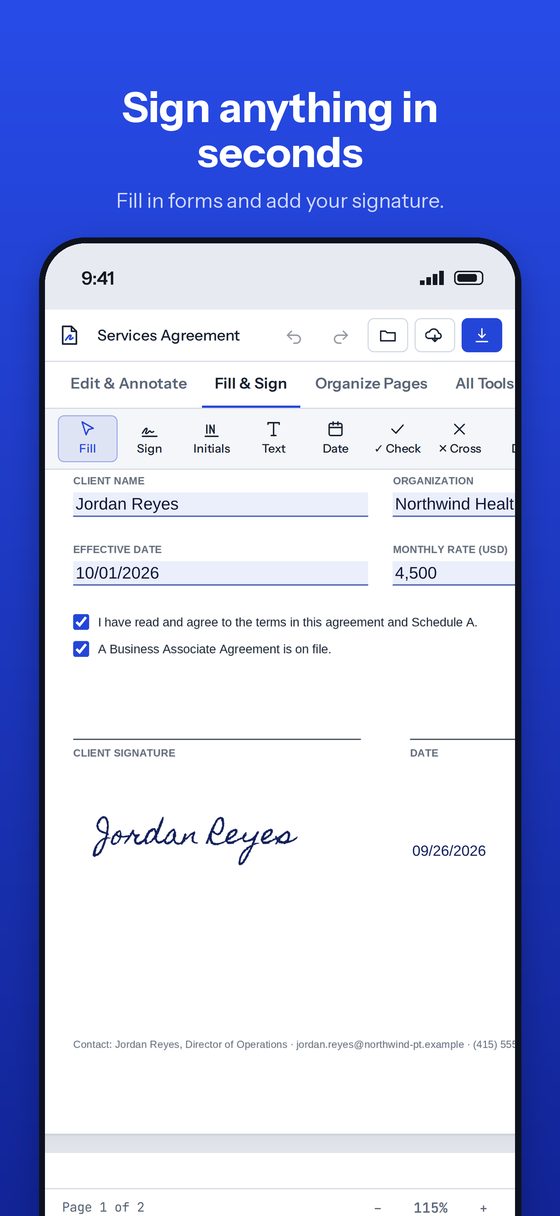
Fill and sign
Fill any form, even ones without fields. Draw, type, or upload your signature.
Organize pages
Drag to reorder. Rotate, delete, merge, split, and extract in a few taps.
Convert to Word Pro
Turn PDFs into Word or Google Docs with fonts, tables, and images intact.
Scan to searchable Pro
OCR turns scanned pages into text you can search, copy, and edit.
Redact and protect Pro
Black out names, emails, and SSNs for good. Lock files with AES passwords.


Private by design.
Many online PDF tools upload your contracts, tax forms, and medical records to their servers. Paperwell doesn't have servers to upload them to.
- Editing, OCR, conversion, and redaction all run on your device.
- No account to create. No email to hand over.
- Files leave only when you share them, and only where you choose.
Simple pricing.
Start free. Upgrade when you need the heavy-duty tools.
Free
Everything most people need.
- View, annotate, and highlight
- Fill and sign
- Organize, merge, and split
- Save and share anywhere
Pro
Or $3.99 a month. Yearly starts with a 7-day free trial.
- Everything in Free
- Convert to Word and Google Docs
- OCR for scanned documents
- Redaction and password protection
- Compress, compare, and Bates numbering
Questions
Does Paperwell work offline?
Yes. Every tool runs on your device, so you can edit and sign on a plane.
Where are my files stored?
In the Paperwell folder in the Files app on iPhone and iPad, and in Finder on a Mac. Nothing is stored on our end.
Does it work on Mac?
Yes, on any Mac with Apple silicon. Download it from the Mac App Store with the same purchase.
How do I cancel Pro?
In Settings, tap your name, then Subscriptions. You keep Pro until the end of the period you paid for. More help
Your PDFs. Your device. Done.
Download Paperwell free and sign your first document in under a minute.
Download on the App Store